AI Sequence Diagram Generator
Learn how to generate complex sequence diagrams in seconds using DrawGPT's AI and Diagram-as-Code syntax. Full syntax reference for participants, messages, activations, and conditional blocks.
DrawGPT is a powerful AI Sequence Diagram Generator that converts plain English descriptions and code snippets into professional interaction diagrams. Whether you're documenting API flows, microservice communication, or authentication handshakes, the Sequence Diagram Maker automates the heavy lifting.
Participants
Participants are the actors in your sequence diagram — services, users, or systems that exchange messages. Simply write a name on its own line to declare one.
Client
Server
Database
Styling Participants
Customize each participant with icons and colors using bracket syntax:
Web Client [icon: browser, color: #3B82F6]
Auth Service [icon: lock, color: #EF4444]
Backend API [icon: server, color: #10B981]
Tip
Icon names come from DrawGPT's built-in icon library. Common options include: browser, server, database, lock, user, cloud, billing, phone.
Messages (Arrows)
Messages represent communication between participants. DrawGPT supports two arrow types:
| Arrow | Syntax | Meaning |
|---|---|---|
| Solid arrow | A -> B: label | Synchronous request |
| Dashed arrow | A --> B: label | Asynchronous response / callback |
Client -> Server: API Request
Server -> Database: SQL Query
Database --> Server: Result Set
Server --> Client: JSON Response
Naming convention
Message labels appear directly on the arrow in the rendered diagram. Keep them short and descriptive — e.g., POST /login, 200 OK, JWT Token.
Global Directives
Global directives customize the overall behavior of your diagram. Place them at the top, before any participant or message declarations.
Title
Add a descriptive header to the diagram:
title Authentication Flow

User -> App: Login
Auto-Numbering
Automatically prepend sequential numbers (e.g., 1, 2, 3) to every message:
title Payment Flow
autoNumber

Customer -> Gateway: Submit Payment
Gateway -> Bank: Authorize
Bank --> Gateway: Approved
Gateway --> Customer: Confirmation
Activations
Activations show that a participant is actively processing over a period of time. They render as a vertical box on the participant's lifeline.
App -> API: Request Data
activate API
API -> DB: Query
DB --> API: Data
deactivate API
API --> App: Response
Nesting
You can nest activations. For instance, while API is activated, DB can also be activated to show a sub-process within the larger operation.
Alt / Else Blocks (Conditional Branches)
Model conditional logic using alt and else blocks. The layout engine wraps the enclosed messages in a labeled container.
App -> Auth Service: POST /login

alt [Valid Credentials] {
    Auth Service --> App: 200 OK (JWT)
} else [Invalid Credentials] {
    Auth Service --> App: 401 Unauthorized
}Client -> API: GET /user/123
alt [User Found] {
API --> Client: 200 OK (User Data)
} else [Not Found] {
API --> Client: 404 Not Found
}Gateway -> Auth: Validate Token
alt [Token Valid] {
Auth --> Gateway: 200 OK
Gateway -> Service: Forward Request
} else [Token Expired] {
Auth --> Gateway: 401 Expired
Gateway --> Client: Redirect to Login
} else [Token Revoked] {
Auth --> Gateway: 403 Forbidden
Gateway --> Client: Access Denied
}Full Example
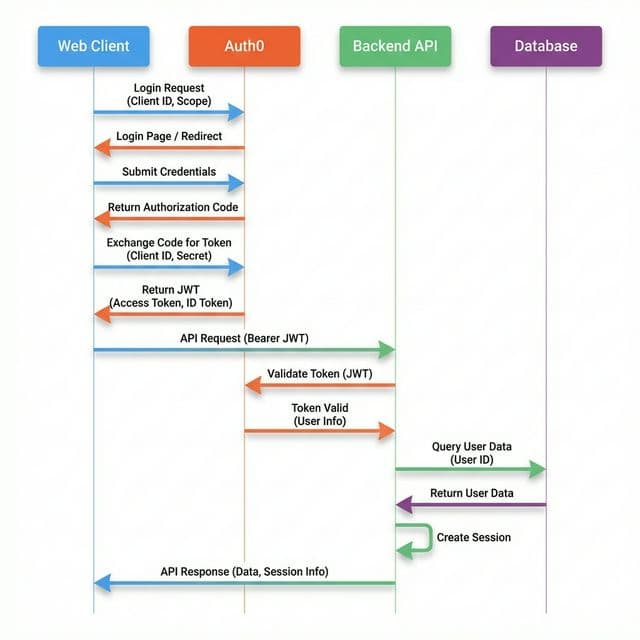
Here's a complete OAuth2 login flow combining all the features:
title OAuth2 Login Flow
autoNumber

Web Client [icon: browser, color: #3B82F6]
Auth0 [icon: lock, color: #F97316]
Backend API [icon: server, color: #10B981]
Database [icon: database, color: #8B5CF6]

Web Client -> Auth0: Login Request (Client ID, Scope)
Auth0 --> Web Client: Login Page / Redirect
Web Client -> Auth0: Submit Credentials

alt [Valid Credentials] {
    Auth0 --> Web Client: Authorization Code
    Web Client -> Backend API: Exchange Code for Token
    activate Backend API
    Backend API -> Auth0: Validate Code
    Auth0 --> Backend API: JWT (Access + ID Token)
    Backend API -> Database: Create Session
    Database --> Backend API: Session ID
    deactivate Backend API
    Backend API --> Web Client: 200 OK (Set Cookie)
} else [Invalid Credentials] {
    Auth0 --> Web Client: 401 Unauthorized
}
Quick Reference
| Feature | Syntax | Example |
|---|---|---|
| Participant | Name | Client |
| Styled participant | Name [icon: x, color: hex] | API [icon: server, color: green] |
| Sync message | A -> B: label | Client -> Server: GET /api |
| Async message | A --> B: label | Server --> Client: 200 OK |
| Title | title Text | title Auth Flow |
| Auto number | autoNumber | — |
| Activate | activate Name | activate Server |
| Deactivate | deactivate Name | deactivate Server |
| Conditional | alt [condition] { ... } | See examples above |
| Else branch | } else [condition] { ... } | See examples above |