AI ERD Generator
Automatically generate Entity Relationship Diagrams (ERDs) and database schemas using DrawGPT's AI and Diagram-as-Code syntax. Full syntax reference for entities, relationships, properties, and styling.
DrawGPT is a specialized AI ERD Generator designed for database architects and developers. Describe your data models in natural language or use our SQL-inspired syntax to instantly visualize table relationships, keys, and field types.
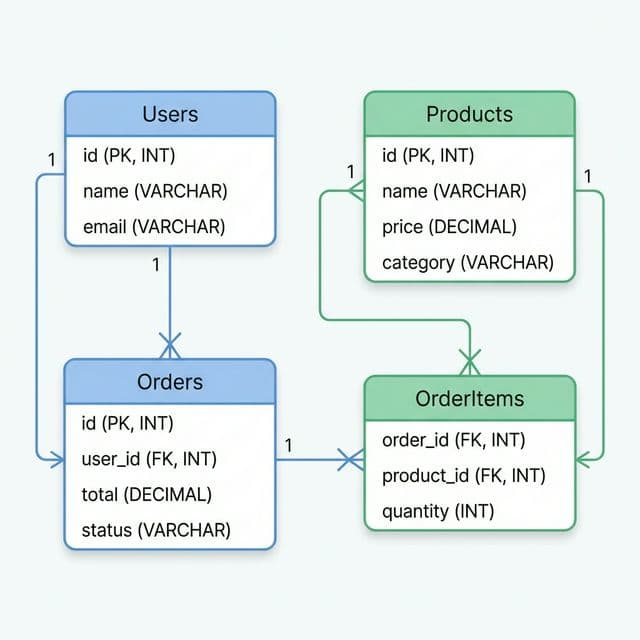
Entities (Tables)
Entities are the building blocks of an ERD. Each entity represents a database table. Declare one by simply writing its name on its own line:
Users
Profiles
Posts
Comments
Styling Entities
Add icons and colors to distinguish different parts of your schema:
Users [icon: user, color: #3B82F6]
Subscriptions [icon: billing, color: #10B981]
Payments [icon: credit-card, color: #F97316]
Naming tip
Use singular or plural — it's your choice. DrawGPT renders exactly what you type. Most database conventions prefer singular (e.g., User), but plural works just as well for readability.
Relationships
Relationships connect entities with labeled arrows. Use arrow syntax to define how tables relate to each other:
| Syntax | Meaning | Example |
|---|---|---|
A -> B: label | Directed relationship | Users -> Posts: Has Many |
A --> B: label | Dashed / weak relationship | Posts --> Tags: Tagged With |
Users -> Profiles: Has One
Users -> Posts: Has Many
Posts -> Comments: Has Many
Users -> Subscriptions: Owns
Relationship Types
Use descriptive labels to convey cardinality and direction:
| Label | Meaning |
|---|---|
Has One | One-to-one (e.g., User → Profile) |
Has Many | One-to-many (e.g., User → Posts) |
Belongs To | Inverse of Has Many |
Many to Many | Many-to-many (often needs a join table) |
Join tables
For many-to-many relationships, create an explicit join entity. For example: Posts -> PostTags: Has Many and Tags -> PostTags: Has Many.
Full Example: E-Commerce Schema
Users [icon: user, color: #3B82F6]
Orders [icon: shopping-cart, color: #10B981]
Products [icon: package, color: #8B5CF6]
OrderItems [icon: list, color: #F59E0B]
Reviews [icon: star, color: #EF4444]

Users -> Orders: Has Many
Users -> Reviews: Has Many
Orders -> OrderItems: Has Many
Products -> OrderItems: Has Many
Products -> Reviews: Has Many
Full Example: SaaS Application
Users [icon: user, color: #3B82F6]
Sessions [icon: lock, color: #EF4444]
Roles [icon: shield, color: #10B981]
Permissions [icon: key, color: #F59E0B]

Users -> Sessions: Has Many
Users -> Roles: Many to Many
Roles -> Permissions: Has Many
Users [icon: user, color: #3B82F6]
Subscriptions [icon: billing, color: #10B981]
Invoices [icon: file, color: #8B5CF6]
PaymentMethods [icon: credit-card, color: #F97316]
Users -> Subscriptions: Has One
Subscriptions -> Invoices: Has Many
Users -> PaymentMethods: Has ManyUsers [icon: user, color: #3B82F6]
Workspaces [icon: folder, color: #10B981]
Documents [icon: file, color: #8B5CF6]
Comments [icon: message, color: #F59E0B]
Users -> Workspaces: Many to Many
Workspaces -> Documents: Has Many
Documents -> Comments: Has Many
Users -> Comments: Has ManyQuick Reference
| Feature | Syntax | Example |
|---|---|---|
| Entity | Name | Users |
| Styled entity | Name [icon: x, color: hex] | Users [icon: user, color: blue] |
| Relationship | A -> B: label | Users -> Posts: Has Many |
| Dashed relationship | A --> B: label | Posts --> Tags: Tagged With |
AI Cloud Architecture Diagram Generator
Design AWS, Azure, and GCP architecture diagrams in seconds with DrawGPT's AI-powered Cloud Architecture Diagram Generator. Full syntax reference for cloud services, icons, groups, and styling.
AI Flowchart Generator
Create professional flowcharts and process maps in seconds using DrawGPT's AI Flowchart Generator. Full syntax reference for node shapes, edges, labels, and styling.