Introduction
Welcome to DrawGPT — the fastest AI Diagram Generator and Diagram-as-Code platform. Create sequence diagrams, ERDs, cloud architectures, and flowcharts from plain English.
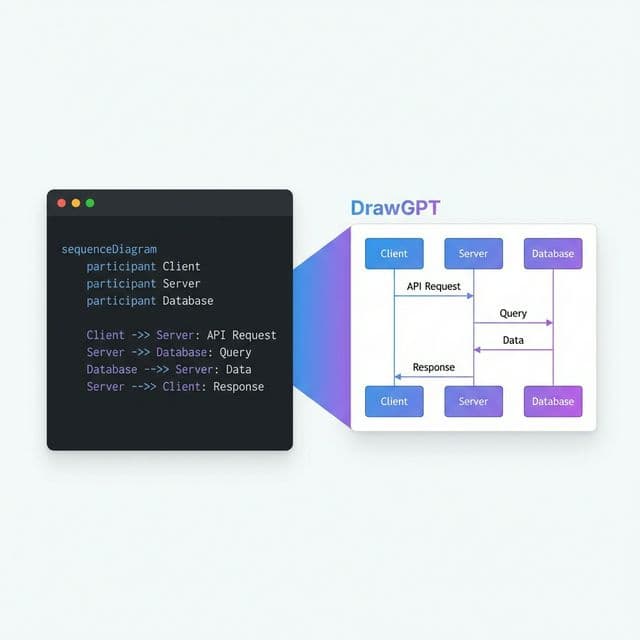
DrawGPT is a next-generation AI Diagram Generator that turns natural language and simple code into professional technical visuals. Powered by LLMs and a real-time rendering engine, it lets you go from idea to diagram in seconds — no dragging, no fiddling.
Try it now
Open the editor and type: "Draw an OAuth login flow between a Web Client, Auth0, and our Backend API." The AI writes the code. The engine renders the diagram. Instantly.
Getting Started
Install nothing — it's a web app
Visit drawgpt.me in any modern browser. No downloads, no dependencies.
Describe or code your diagram
Use the AI Chat to describe what you need in plain English, or write the syntax yourself in the code editor. DrawGPT supports four diagram types out of the box.
Export and share
Download your diagram as PNG or SVG, or share a link with your team. Every diagram is rendered on an infinite, pannable canvas.
Supported Diagram Types
AI Sequence Diagram Generator →
Visualize system interactions, API calls, and authentication flows over time. Supports participants, activations, alt/else branches, and auto-numbering.
Client -> Server: API Request
Server -> Database: SQL Query
Database --> Server: Result Set
Server --> Client: JSON ResponseDesign database schemas and entity relationships. Define tables, map one-to-many and many-to-many connections, and style entities with icons.
Users -> Posts: Has Many
Posts -> Comments: Has Many
Users -> Profiles: Has OneMap out business processes, algorithms, and decision trees. Choose from multiple node shapes — rectangles, diamonds, cylinders, and more.
Start Process [shape: rounded-rectangle]
Check Payment [shape: diamond]
Start Process --> Check Payment
Check Payment --> Fulfill Order: [Payment Success]
AI Cloud Architecture Diagram Generator →
Build infrastructure diagrams for AWS, Azure, and GCP. Leverage a massive built-in icon library for services like Lambda, API Gateway, S3, and more.
AWS Route53 --> AWS API Gateway: routes traffic
AWS API Gateway --> AWS Lambda: triggers
AWS Lambda --> Amazon DynamoDB: reads/writes
What is Diagram-as-Code?
Diagram-as-Code means defining your visuals in plain text instead of dragging boxes around in a GUI. Think of it like Markdown for diagrams:
| Feature | Traditional Tools | Diagram-as-Code |
|---|---|---|
| Speed | Drag & drop each element | Type it in seconds |
| Version Control | Screenshots in Confluence | Text diffs in Git |
| AI-Compatible | Manual only | LLMs can write it natively |
| Consistency | Ad-hoc styling | Deterministic layout engine |
| Collaboration | Email PNGs around | Share a text file |
Why text beats drag-and-drop
DrawGPT's DSL is designed to be readable by humans and writable by AI. The layout engine handles positioning, spacing, and routing automatically — so you focus on what to draw, not where to place it.
AI Assistant
Not sure how to write the syntax? The integrated AI chat understands all four diagram types natively.
You say: "Show me a microservice architecture with an API Gateway, three services, and a shared Redis cache."
DrawGPT writes the code and renders it on your canvas — ready to edit, export, or extend.
The AI also supports:
- Editing existing diagrams — "Add a Database node connected to the User Service"
- Explaining syntax — "What does
activatedo in a sequence diagram?" - Converting between types — "Turn this flowchart into a sequence diagram"
Select a diagram type from the sidebar to learn the full syntax →