AI Cloud Architecture Diagram Generator
Design AWS, Azure, and GCP architecture diagrams in seconds with DrawGPT's AI-powered Cloud Architecture Diagram Generator. Full syntax reference for cloud services, icons, groups, and styling.
DrawGPT features a professional AI Cloud Architecture Diagram Generator that supports major cloud providers including AWS, Azure, and GCP. Use our AWS Architecture Diagram Maker to convert complex infrastructure requirements into clean, icon-rich diagrams using simple text.
Service Nodes
Declare cloud services by writing their name. The layout engine automatically positions them:
AWS Route53
AWS API Gateway
AWS Lambda
Amazon DynamoDB
Styling with Cloud Icons
Make diagrams professional with the built-in icon library. Use [icon: keyword] syntax:
API Gateway [icon: aws-api-gateway, color: #FF9900]
Lambda Function [icon: aws-lambda, color: #FF9900]
RDS Database [icon: aws-rds, color: #527FFF]
S3 Bucket [icon: aws-s3, color: #569A31]
Icon naming
Icon names follow the pattern provider-service, e.g., aws-lambda, azure-functions, gcp-cloud-run. Use lowercase with hyphens. DrawGPT's icon library covers 100+ cloud services.
Connections
Connect services with directional arrows using --> syntax, plus descriptive labels:
AWS Route53 --> AWS API Gateway: routes traffic
AWS API Gateway --> AWS Lambda: triggers
AWS Lambda --> Amazon DynamoDB: reads/writes
Provider Examples
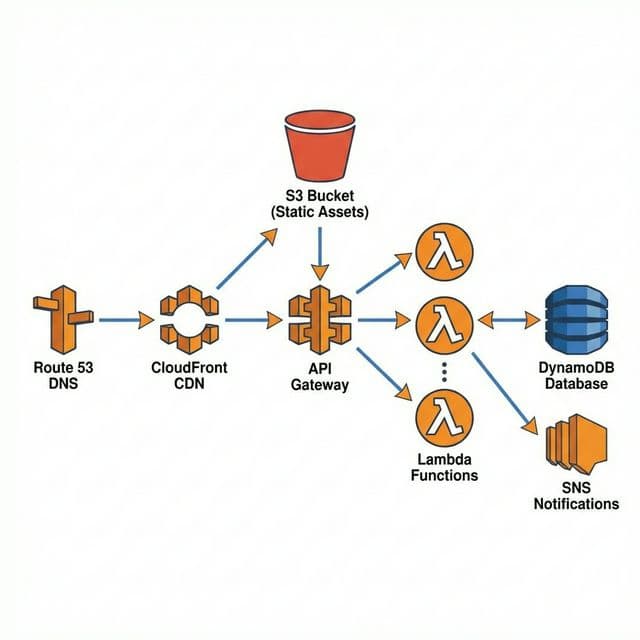
A serverless REST API on AWS:
Route53 [icon: aws-route53, color: #8C4FFF]
CloudFront [icon: aws-cloudfront, color: #8C4FFF]
API Gateway [icon: aws-api-gateway, color: #FF9900]
Lambda [icon: aws-lambda, color: #FF9900]
DynamoDB [icon: aws-dynamodb, color: #527FFF]
S3 [icon: aws-s3, color: #569A31]
SNS [icon: aws-sns, color: #FF4F8B]

Route53 --> CloudFront: DNS resolution
CloudFront --> API Gateway: forwards requests
CloudFront --> S3: static assets
API Gateway --> Lambda: invokes function
Lambda --> DynamoDB: read/write data
Lambda --> SNS: send notifications
A web application on Azure:
Azure DNS [icon: azure-dns, color: #0078D4]
App Service [icon: azure-app-service, color: #0078D4]
Azure Functions [icon: azure-functions, color: #FFC107]
Cosmos DB [icon: azure-cosmos-db, color: #0078D4]
Blob Storage [icon: azure-blob, color: #0078D4]
Service Bus [icon: azure-service-bus, color: #0078D4]

Azure DNS --> App Service: routes traffic
App Service --> Azure Functions: triggers
Azure Functions --> Cosmos DB: read/write
Azure Functions --> Blob Storage: file storage
Azure Functions --> Service Bus: async messaging
A data pipeline on Google Cloud:
Cloud DNS [icon: gcp-dns, color: #4285F4]
Cloud Run [icon: gcp-cloud-run, color: #4285F4]
Cloud Functions [icon: gcp-functions, color: #4285F4]
Firestore [icon: gcp-firestore, color: #FBBC04]
Cloud Storage [icon: gcp-storage, color: #4285F4]
Pub/Sub [icon: gcp-pubsub, color: #4285F4]
BigQuery [icon: gcp-bigquery, color: #669DF6]

Cloud DNS --> Cloud Run: routes traffic
Cloud Run --> Firestore: read/write
Cloud Run --> Pub/Sub: publish events
Pub/Sub --> Cloud Functions: trigger
Cloud Functions --> BigQuery: load data
Cloud Functions --> Cloud Storage: store files
Common Icon Reference
AWS Icons
| Icon Keyword | Service |
|---|---|
aws-lambda | AWS Lambda |
aws-api-gateway | Amazon API Gateway |
aws-dynamodb | Amazon DynamoDB |
aws-s3 | Amazon S3 |
aws-rds | Amazon RDS |
aws-ec2 | Amazon EC2 |
aws-ecs | Amazon ECS |
aws-sqs | Amazon SQS |
aws-sns | Amazon SNS |
aws-cloudfront | Amazon CloudFront |
aws-route53 | Amazon Route 53 |
aws-cognito | Amazon Cognito |
aws-elb | Elastic Load Balancer |
Azure Icons
| Icon Keyword | Service |
|---|---|
azure-app-service | Azure App Service |
azure-functions | Azure Functions |
azure-cosmos-db | Azure Cosmos DB |
azure-blob | Azure Blob Storage |
azure-sql | Azure SQL Database |
azure-service-bus | Azure Service Bus |
azure-dns | Azure DNS |
azure-aks | Azure Kubernetes Service |
GCP Icons
| Icon Keyword | Service |
|---|---|
gcp-cloud-run | Cloud Run |
gcp-functions | Cloud Functions |
gcp-firestore | Cloud Firestore |
gcp-bigquery | BigQuery |
gcp-storage | Cloud Storage |
gcp-pubsub | Pub/Sub |
gcp-gke | Google Kubernetes Engine |
gcp-dns | Cloud DNS |
Full Example: Microservices on AWS
Route53 [icon: aws-route53, color: #8C4FFF]
ALB [icon: aws-elb, color: #8C4FFF]
User Service [icon: aws-ecs, color: #FF9900]
Order Service [icon: aws-ecs, color: #FF9900]
Payment Service [icon: aws-lambda, color: #FF9900]
Users DB [icon: aws-rds, color: #527FFF]
Orders DB [icon: aws-dynamodb, color: #527FFF]
Stripe Webhook [icon: server, color: #635BFF]
SQS Queue [icon: aws-sqs, color: #FF4F8B]
SNS Topic [icon: aws-sns, color: #FF4F8B]
S3 Exports [icon: aws-s3, color: #569A31]

Route53 --> ALB: DNS
ALB --> User Service: /api/users
ALB --> Order Service: /api/orders
User Service --> Users DB: read/write
Order Service --> Orders DB: read/write
Order Service --> SQS Queue: enqueue payment
SQS Queue --> Payment Service: process
Payment Service --> Stripe Webhook: charge
Payment Service --> SNS Topic: payment result
SNS Topic --> Order Service: update status
Order Service --> S3 Exports: generate invoice
Quick Reference
| Feature | Syntax | Example |
|---|---|---|
| Service node | Name | AWS Lambda |
| Styled node | Name [icon: x, color: hex] | Lambda [icon: aws-lambda, color: #FF9900] |
| Connection | A --> B: label | API --> Lambda: triggers |
Introduction
Welcome to DrawGPT — the fastest AI Diagram Generator and Diagram-as-Code platform. Create sequence diagrams, ERDs, cloud architectures, and flowcharts from plain English.
AI ERD Generator
Automatically generate Entity Relationship Diagrams (ERDs) and database schemas using DrawGPT's AI and Diagram-as-Code syntax. Full syntax reference for entities, relationships, properties, and styling.